India’s first Ferrari Purosangue has been delivered to a Bangalore-based real estate magnate. Popularly known on social media as @bren_garage, Boopesh Reddy owns an exquisite collection of supercars, including a Ferrari 812 Competizione and SF90 Stradale.
The Purosangue is finished in an all-black spec with gloss black single-tone wheels, red brake calipers and Ferrari shields on the fenders. The interior is wrapped in dark brown Alcantara upholstery.
The Purosangue is Ferrari’s first four-door SUV that looks more like a sporty hatchback. It has four seats with Rolls-Royce-style suicide doors at the rear.
Powering the Ferrari Purosangue is a 6.5-liter V12 engine. This naturally aspirated motor develops 725 hp and 528 lb-ft of torque @ 6250 rpm. It is paired with an 8-speed dual-clutch automatic transmission. Ferrari claims a 0-62 mph time of 3.3 seconds and a top speed of 193 mph.
Volvo on Friday said it planned to reduce its stake in Polestar by 62%, and cease funding the electric vehicle startup as it focuses funding its own transformation into a fully electric brand.
The shares in Polestar will be distributed to Volvo’s own shareholders, the biggest of which is Zhejiang Geely which owns 79.5% of the company. The move will give Geely more control of Polestar. Geely’s chairman, Li Shufu, is also a major shareholder of Polestar with a 39% stake.
At Polestar’s current share price, the shares are valued at around $921 million. After the close of the deal, Volvo will still retain about 18% of Polestar.
In a statement, Volvo CEO Jim Rowan said it was “logical” to retain some influence in Polestar given the close collaboration between the two companies.
2024 Polestar 2
Polestar, which was originally a Swedish racing team and then the performance arm of Volvo before becoming a standalone EV brand in 2017, currently shares technologies, production facilities, and other commercial operations with Volvo. Polestar also has a loan owed to Volvo.
Polestar, which become a public company in 2022, won’t have to completely fend for itself. Geely will continue to provide funding, while the collaboration between Volvo and Polestar will also continue.
Polestar is also expected to grow its sales sharply in 2024 with the arrival of the Polestar 3 and Polestar 4 SUVs. Polestar last year delivered approximately 54,600 vehicles, mostly the Polestar 2 hatchback. That tally is 6% higher than 2022’s deliveries.
As an electric car owner in Australia, I’ve always wondered what it’d be like to get behind the wheel of a big adventure-focused EV.
Unfortunately we don’t get Rivians in Australia; but the opportunity came up to rent a Rivian in the US, so we thought we’d give it a shot to see what it’s like.
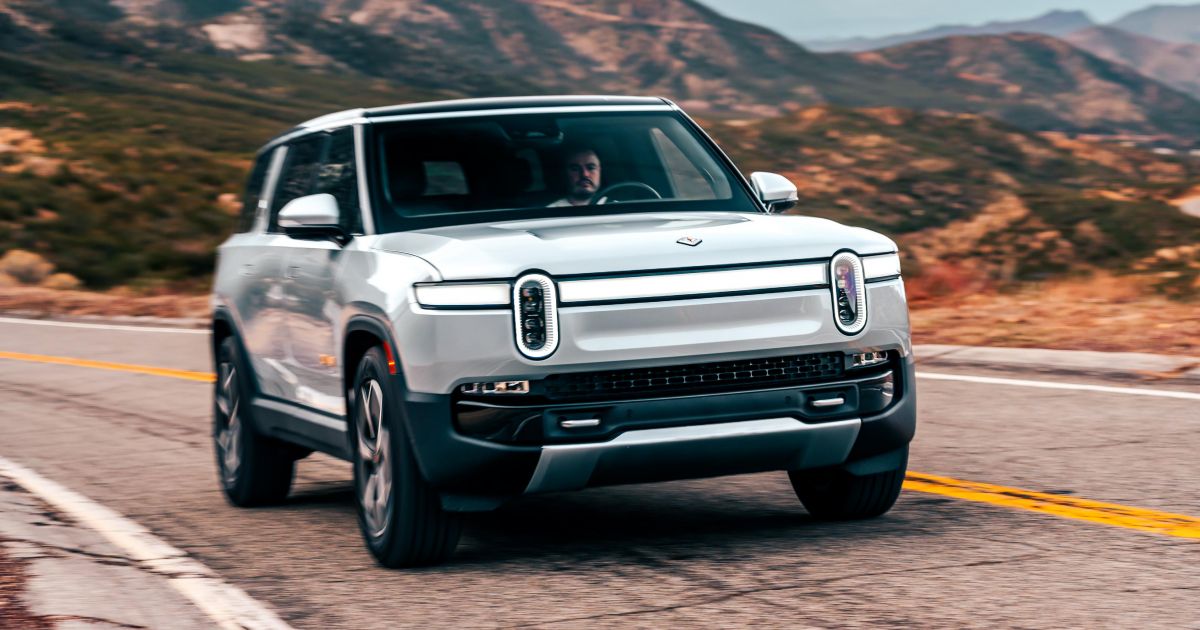
We rented a 2024 Rivian R1S Adventure quad-motor and headed for the hills to find some corners and see how practical this big SUV would be. We only had a day with the vehicle, so this will be a more condensed, brief version of our typical reviews.
How much does the Rivian R1S cost?
Rivian sells a dual-cab ute called the R1T and this seven-seat SUV called the R1S. Both can be configured either as primary highway vehicles, or configured with all-terrain tyres and accessories for those with a more adventurous bent.
Pricing for the R1S kicks off from US$74,900 (A$115,000) before on-road costs and the quad-motor option adds a further US$8000 to the asking price, which comes out to US$92,000 (A$141,000) before on-roads.
While the mid-spec Performance dual-motor and entry-level dual-motor can be optioned with larger battery packs, the top-spec version comes with a 135kWh battery. Optioning the 149kWh Max battery pack adds a further US$19,100 to the asking price on the base and mid-spec Performance models.
There are a number of additional accessories you can also option, but the headline acts are non-standard paint at US$2500 and the all-terrain package for US$3600, which includes all-terrain tyres and underbody protection.
What is the Rivian R1S like on the inside?
While the R1S looks pretty cool on the outside (styling, of course, being subjective), it’s inside the cabin where they have hit the ball out of the park.
It’s futuristic, but minimalist and functional at the same time. Rivian have kept it adventure ready, but included enough luxury to make you feel better about dropping about $150,000 on one.
Even clever features like hard-wearing elastic door pockets, through to a large portable Bluetooth speaker that slots beneath the centre console have been considered. I loved the key too – it featured a rubber finish, but also had a clip to attach to your pants – simple, but again focussed on the adventure types.
Just like Tesla, most of the fun features sit within the central 15.6-inch display. The display is sharp, very fast and easy to use. Everything is logically placed and built into the screen are all of your audio streaming functions, satellite navigation and connectivity features.
But disappointingly, you won’t find Apple CarPlay or Android Auto. Owners instead need to use aftermarket options to achieve this fairly basic functionality.
Also disappointingly, Rivian dropped their partnership with Meridian and as a result speaker count dropped to 18 speakers. While it’s still a huge speaker count, there’s no brand visible and the audio quality is pretty average for what should be a fairly premium offering.
It was also disappointing to see the poor build quality. Some of the panels on our car were misaligned and inside the cabin you could hear creaking when pushing on some door surfaces or driving across uneven road surfaces.
Our car also presented a suspension air compressor overheat warning at one point that prevented the vehicle from being able to go up or down as part of a change in drive modes.
Outside of this, the interior was nicely presented with open pore woodgrain along the dashboard, a stack of room in both the first and second rows, along with a litany of USB connectivity and power outlets for vehicle-to-load functionality.
Clever outdoor features included a camp mode that would level the vehicle for sleeping and the ability to control battery use, exterior lighting and climate while camping. There was even a mode that would put the vehicle into a quiet mode so as to not disturb those camping around the vehicle.
The third row was a bit cramped for adults, but there’s plenty of room for kids and it was easy to climb into and out.
Adults can afford themselves slightly more knee room by sliding the second row forward or dropping the centre portion of the second row for more knee room. Back there you’ll also find a storage bin, more charging and air vents.
Cargo capacity comes in at 498 litres behind the third row, 1331L with the third folded (keep in mind it doesn’t fold flat) and 2498L with the second and third rows folded. In addition to these you’ll find 314L of storage within the electronically controlled and opening front boot and 144L in the rear bin beneath the cargo floor.
For such a big vehicle they’ve been able to cram a heap of storage within as many spaces as they could find, which is great news.
What’s under the bonnet?
The R1S quad-motor uses four electric motors – that’s one on each wheel.
This type of motor distribution not only gives you granular torque control for scenarios like off-road driving, but also allows somewhat useless functions like tank turns (which Rivian showed as a marketing stunt, but a function you can’t actually use as a customer).
These four motors offer a combined 623kW of power and 1231Nm of torque. It’s an absolutely stupendous amount of grunt. You also can’t deny how heavy this thing is with a 135kWh battery and four electric motors. It tips the scales at around 3200kg – that’s before you and the family sit inside it. That also means a big turning circle of 13.2 metres.
But with four motors comes cracking acceleration. It’ll do 0-60mph (0-97km/h) in just 3.0 seconds. Our testing delivered a 0-100km/h time of around 3.7 seconds – so a little off the claim, but we were going to around 62mph (100km/h) and also were testing with a lower battery level, which affects straight-line acceleration performance.
Combined energy economy comes out to 33.5kWh/100km, which is around 100 per cent higher than something like a Tesla Model Y – granted, a Model Y isn’t this size, this capable off-road and doesn’t have seven seats in Australia; but I’m just using it as a point of reference.
During our time with the car the battery size also highlighted one of the big issues with wall charging in the US. The 120V electrical architecture means the vehicle can’t charge at the same power level as we can in Australia.
The simple Ohm’s law for a DC circuit states that power is voltage multiplied by current. By halving the power, you also halve the power output. In the case of US power circuits they run at a slightly higher current, but not enough to overcome the halving of voltage.
At one point when we tried to charge the vehicle from a domestic power socket, it showed a charging time of around 150 hours or equivalent to six days. There was a further saga with public charging, but we’ll cover that in more detail in a future video.
How does the Rivian R1S drive?
One of the first things I noticed when we drove away from the rental place in Los Angeles was how poorly tuned the ride was. It crashed over minor imperfections and was very busy – and this was in the ‘soft’ setting. Moving that setting over to ‘stiff’ made the ride diabolically bad.
Initially I thought the tyre pressures weren’t set correctly, but we double checked those. A lot of it will come down to the vehicle riding on 21-inch alloy wheels, the smallest wheel size before you move to the chunkier all-terrain tyres.
If you isolate the ride though, the rest of the package is pretty decent. Acceleration is next level – regardless of which drive mode you’re in. Just punch the throttle and it throws you back into the seat like a small sports car.
The regen is great and it also has a single-pedal driving mode that works really well. The steering is a bit vague, but good enough for a vehicle this size.
We didn’t get much of a chance to test out the Drive+ functionality (Rivian’s terminology for Level 2 autonomy), but the brief test we did on the freeway showed a high level of confidence and an ease of use. Unlike Tesla, Rivian uses a mix of cameras, radar and ultrasonic sensors for its suits of parking and autonomy technology.
Speaking of cameras, I was pretty surprised at how poor the camera quality was for Gear Guard (Rivian’s camera-based security system) and for the parking cameras. They were low quality and didn’t offer a great deal of detail in comparison to other modern vehicles on the market.
We found a nice mountain road to stretch the R1S’s legs and it really exacerbated the poor ride. As the speed picked up it would crash over road joins and changes in elevation. It felt super heavy through corners and the brakes didn’t deliver a great deal of confidence.
There’s only so much you can do with a vehicle that weighs this much – physics will always win when you try and feel that much torque through four small patches of rubber.
If you intend to drive the R1S off-road, it has some pretty meaty specs. We’re talking a standard ground clearance of 203mm before you jack the ride up – it can then climb to 378mm.
Approach and departure angles are 35.6 and 34.3 degrees respectively, while wading depth is an insane 1084mm. There are also rated recovery points with rubber backs to prevent damage during recovery attempts.
In terms of actual driving range and charging speeds, the 135kWh battery can be charged at a maximum DC charging speed of 210kW with an average 125kW charge speed. AC charging can occur over three phases at up to 11.5kW.
In this specification there’s a claimed 516km of driving range (321 miles).
CarExpert’s Take on the Rivian R1S
So this was only a short drive in the Rivian R1S, but it showed the brand still has a bit of work to do.
The ride needs improvement, as does the handling and steering. Attention and also needs to be shown to build quality. But, thankfully, all of these things are relatively easy to fix if you hire the right people and pay enough attention to them.
With these things addressed, Rivian has a great looking vehicle that is built for an adventurer with a big family. There’s a smaller version of the R1S being revealed in the coming weeks and it’s likely to show a more progressive and sedate approach to the formula on offer with the R1S and we’re excited to see what that’s like.
We’d also love to see these on sale in Australia eventually – I could definitely see an R1T in my future.
Volvo will stop funding Polestar, in a move that will give its parent, China’s Geely greater control of the EV brand.
But according to Volvo, in terms clarified on Friday, it won’t completely let go. It will retain about 18% of Polestar shares, while the rest of it will go to Volvo’s shareholders—allowing its majority owner Geely to boost its share.
The news comes after Polestar announced that it missed already-reduced 2023 delivery targets. The brand’s shares have plunged since it went public in June 2022 via a merger with a special purpose acquisition company (SPAC).
Geely owns around 80% of Volvo, so this would give the Chinese automaker more direct control over Polestar. It might also make it easier for Geely to sell down its stake in Volvo in the future, Reuters noted, adding that Polestar’s stock hasn’t performed especially well since a 2021 initial public offering (IPO), either.
Polestar 5
In a statement from the automaker, Volvo CEO Jim Rowan said that it was “logical” for it to keep some influence in Polestar. Earlier in the month, in an interview with CNBC, Rowan called the move a “natural evolution” for Polestar, saying the time was right to look for other sources of funding for the brand to continue its growth. For now though, the two brands are connected by more than just stock ownership.
Polestar began as a racing team closely aligned with Volvo, and it evolved into a performance brand and factory “tuner” for Volvo before Geely launched it as a standalone brand in 2017. That resulted in the Polestar 1 plug-in hybrid first, in 2019, followed by the Polestar 2 in 2020. The U.S.-built Polestar 3 electric SUV is due this year, and a smaller Polestar 4 electric SUV built in South Korea will arrive next year.
Polestar has been pulling in its own direction already, with plans to make its own motors and other propulsion components. The brand’s next model, the Polestar 3 SUV, still shares many components with the Volvo EX90, though
2024 Polestar 2 single motor
That leaves the Polestar 2 as the brand’s only model for now, but it’s been steadily improving. The 2024 Polestar 2 marks a switch to rear-wheel-drive and rear-wheel-biased, and it’s a better car than what originally arrived.
In the U.S. Polestar has been able to take advantage of Volvo’s dealer service network. With more distance between the brands, that may cast some uncertainty into whether the arrangement will continue.
— UPDATED, adding information to clarify a report originally published Feb. 2
PaxPower is back with a new round of Jackal off-road performance upgrades, this time designed for full-size SUV applications.
It’s the Texas company’s first upgrades designed specifically for SUVs, and they fit General Motors’ full-size Cadillac Escalade, Chevrolet Tahoe/Suburban, and GMC Yukon. The upgrades fit the 2021 models right up to the latest 2025 models.
The transformation starts with a new suspension. Depending on the selected package, PaxPower adds 2.5-inch coil-overs from such brands as Fox Racing, Icon Vehicle Dynamics, and King Racing Shocks. The company also adds new control arms that give each vehicle 3.0 inches of lift at the front and 1.0 inch at the rear. In addition to providing more ground clearance, the extra lift also provides space to fit 35-inch off-road tires.
Buyers looking to add power also have an option. GM’s 6.2-liter V-8 tends to be the most popular powertrain for Jackal conversions, and PaxPower has a supercharger upgrade that boosts output to 650 hp and 650 lb-ft of torque. The upgrade also includes a high-flow intake, a separate cooling system, a Borla exhaust system, and an ECU retune.
A Brembo brake package is also available to ensure the SUVs stop as hard as they go. The brake package is straight out of the GM Performance catalog and includes 6-piston calipers.
PaxPower also offers a number of additional accessories. Popular items include custom interiors, powered steps, graphics, and additional lightning.
Jackal upgrade packages for the GM SUVs are priced from $15,000.
Welcome, you savvy traveller you, to the city that never fails to deliver the magic – New York City! In this insightful NYC travel guide, we’re about to gift you with a treasure trove of cost-free experiences and adventures that will elevate your journey through the Big Apple without breaking the bank. If you’re ready to unlock the secrets of budget-friendly adventures and free things to do in New York – you’ve landed in the perfect spot!
Nestled on the eastern coast of the United States, New York City beckons travellers time and time again with its magnetic charm, bustling streets and boundless possibilities. Whether you’re a solo backpacker passing through, on a family trip seeking affordable fun, or a curious soul eager to explore the big city without financial constraints, New York City offers it all.
New York is notorious for being one of the most expensive cities in the world. After all, it is a hub of upmarket restaurants, designer shopping and extravagant hotels. But having interned there for a year while being paid a very modest wage, it’s safe to say I got to know a very different (although equally as amazing IMO!) side of New York than is portrayed in movies and Sex And The City.
Beyond New York City’s dazzling Broadway shows, lies a city teeming with free attractions, hidden gems, and cultural delights waiting to be uncovered. You don’t have to spend a lot to adventure in New York and you’ll soon see that for yourself in this list of free things to do in New York City.
Other blog posts you might enjoy:
1. The Brooklyn Bridge
Let’s be honest – when you go to New York, you want to feel like the main character in your own NYC movie. And the best place to do that is the Brooklyn Bridge.
When it comes to the Manhattan skyline, the views from the Brooklyn Bridge are unmatched. When I first moved there, I had my big “I made it” moment on the bridge and it’s a core memory I’ll never forget.
In New York, it’s not unusual to spend upwards of $50 for viewing platforms like The Top Of The Rock. Although those are fantastic and worth doing if it’s in your budget, one of the best views of New York is free from the Brooklyn Bridge. You can see everything, from The Statue Of Liberty to the One World Trade Centre.
Not to mention it’s a great photo-op! One of the free things to do in New York City? I think so!
Processed with VSCO with f2 preset
2. Explore New York City’s Parks
Despite being known as a concrete jungle, there’s no shortage of beautiful parks in New York City so exploring them is up there with the free things to do in New York City.
Central Park
Certainly the most iconic park in the city, Central Park is a must-see for your visit to New York. It’s not just any old park – there is so much to see, from the ‘Imagine’ mosaic marking the spot where John Lennon was killed to the famous Bethesda fountain.
There are also seasonal activities to enjoy depending on the time of year you visit, like rowing boats and Shakespeare In The Park shows in the spring and summer months and ice skating in the winter.
It’s also packed full of filming locations from all your favourite NYC-based movies and TV shows – but more on that a little later!
Bryant Park
Just a few blocks away from Times Square, Bryant Park has always got something going on that’s worth checking out. In the Summer months, you can look forward to live performances as part of the Bryant Park Picnic Performances, a free outdoor festival that features Broadway performers, opera singers and everything in between.
And in the winter, you’ve got the Winter Village where you’ll find market stalls with delicious foods, gifts and trinkets and an ice skating rink (also free if you bring your skates!)
Washington Square Park
If you like your day at the park to come with a little entertainment, Washington Square Park is the place to be. It’s a hub of activity, particularly in the summer months. You can expect live music, artists in action, and even career chess players, making this the perfect spot for people-watching.
This is another park that’s rich with history and is known for the arch at its centre which honours George Washington.
3. Free Museum Days
A lot of New York museums have adopted a ‘pay what you wish’ policy, which makes them pretty affordable most of the time. But did you know that on certain days admission is free? Cue, free things to do in New York City.
American Folk Art Museum: Always free, but it’s recommended that you make a reservation.
The Jewish Museum: Free on Saturdays and some Jewish Holidays.
The Morgan Library and Museum: Free on Fridays between 5-7 pm.
Whitney Museum Of American Art: Free 5 pm-10 pm on Fridays.
4. The Staten Island Ferry
If you’re planning a trip to New York, I bet you’ve got The Statue Of Liberty on your list of things you’d like to see. So, you’ve got a few options:
You can pay for a trip to Liberty Island or book one of the Liberty Cruises, which can cost anything from around $20.
Or you can be a super savvy traveller and hop onto the Staten Island Ferry which passes right by The Statue Of Liberty and costs a total of $0.
The ferry runs 24 hours per day, 7 days a week every 15-30 minutes, making it a quick, easy and wallet-friendly way to catch a glimpse of Lady Liberty!
Travel tip:
Top tip: try to catch the ferry at sunset for the most spectacular views.
5. The High Line
Though The High Line is technically another park, this one’s a little different to the ones just mentioned. It’s a linear park built on a historic elevated railway line.
Not only can you catch some amazing views from there, but The High Line also has an abundance of gorgeous greenery and interesting art to see as you walk along – you can even catch a live performance if you’re lucky.
The High Line can be found right off The Chelsea Market and makes the perfect peaceful oasis away from the hustle and bustle of Manhattan.
6. See The Sights From Movies
One thing that New York City isn’t short of is famous movie and TV locations, and there are plenty that you can check out for free!
The Hook and Ladder Company 8 FireHouse from Ghostbusters
Carrie Bradshaw’s Apartment from Sex And The City
The Plaza Hotel from Home Alone 2
The Met Steps and Grand Central Station from Gossip Girl
The Friends’ Apartment Building
Katz’s Deli from When Harry Met Sally
The Tiffany And Co. Jewellery Store from Breakfast at Tiffany’s
If you love movies, this is one of the best free things to do in New York City.!
Processed with VSCO with a4 preset
7. Explore DUMBO neighbourhood
There’s one big mistake that a lot of travellers make when they visit New York: they only stick to Manhattan! There are plenty of great things to see and do in Brooklyn, which is just a stone’s throw away from Manhattan, and one of the coolest neighbourhoods to explore is DUMBO, which stands for Down Under Manhattan Bridge Overpass.
It’s certainly one of the most Instagrammable spots in New York and in my opinion one of the best free things to do in New York City. You’ll even find a man-made beach with the perfect view of the Brooklyn Bridge and Manhattan.
DUMBO is the perfect place to grab a coffee and explore while you take in the stunning view.
8. Visit Times Square
It may be busy and a little bit of a tourist trap, but can you say you’ve visited New York if you didn’t see Times Square?
It’s chaotic, busy and maybe even a little overwhelming but it’s iconic and SO much fun, especially for your first visit. You have to experience the spectacle of it at least once! It’s another New York location that feels like it’s straight from a movie.
It’s full of things to do from famous American chain restaurants to Broadway shows and shopping, but walking around and soaking up all of Times Square’s crazy energy is completely free.
9. The 9/11 Memorials
The 9/11 attacks are such an important part of New York’s recent history and the memorial in downtown Manhattan is a beautiful tribute to the victims that’s worth visiting on your trip.
The Memorial consists of the two reflection pools that are located at the original World Trade Centre sites. Around the pools, you’ll find the names of the victims engraved on the bronze panelling.
As you can imagine, it’s very poignant, but it is a lovely memorial that’s so well done. The 9/11 Museum is also in the area, as well as the Oculus, a shopping centre and train station that’s designed to look like a bird taking flight to symbolise hope in the aftermath of the attacks.
10. The New York Public Library
The New York Public Library is a book lover’s dream.
Not only is this undoubtedly one of the most beautiful buildings in the city, with its amazing architecture and rows upon rows of books, but it’s also shrouded in history.
There’s even a free exhibition there right now that is completely free of charge and worth checking out.
In the Polonsky exhibition, you’ll find so many fascinating artefacts, from Charles Dickens’ writing desk to Thomas Jefferson’s copy of the Declaration of Independence. The real Winnie The Pooh is even displayed there.
Are there any other free things to do in New York that you would add to this New York travel guide?
Love as always and happy adventuring…
Frankie Higginson
I’m a 24 year old writer from Northern Ireland with a big love of all things travel and adventure. I recently just came back from living in New York City for a year (my biggest ‘fun fact’ that I will be milking for the rest of my life!). While I was there, not only did I explore the big apple but I also took the opportunity to see as much of the States as possible, usually on an intern’s budget, so I’ve got plenty of tips and tricks to share!
Mercedes reels back its global targets for EV sales, although it’s still pushing ahead with current EV plans. Volvo details how it’s backing away from Polestar. And EVs will likely get cheaper than gasoline vehicles before the end of the decade. This and more, here at Green Car Reports.
Mercedes-Benz has delayed its EV targets announced earlier in the decade. While it had planned for EVs and hybrids to make up 50% of its sales by 2025, it now expects to hit that target in 2030. It also appears to have scrapped its plan to only sell EVs by 2030 where market conditions allowed.
Volvo has clarified how it will shed most of its stake in Polestar, as the EV startup struggles and has become, as some have observed, a drag on Volvo resources.
Before the end of the decade, EVs may be cheaper than gas models. According to a study out this week from the International Council on Clean Transportation (ICCT), a glut of lithium plus Biden policy will result in lower battery prices and, most importantly, much lower EV sticker prices relative to gasoline vehicles. The affordability gains will happen without Biden incentives, just more slowly.
Mercedes-Benz Malaysia (MBM) has introduced the C350e AMG Line to the fifth-generation (W206) C-Class range. The new plug-in hybrid variant is locally assembled (CKD) in Pekan, Pahang and is currently listed with an estimated price of RM355,000 on-the-road without insurance.
It joins the existing C200 Avantgarde that goes for RM292,888 and replaces the C300 AMG Line that was previously priced at RM333,888. The latter was confirmed by MBM during a press conference following the reveal, and a quick check of the Mercedes-Benz Malaysia website revealed the C300 spec sheet has indeed been removed.
The C350e features a 2.0 litre turbocharged inline-four petrol engine that serves up 204 PS (201 hp or 150 kW) at 6,100 rpm and 320 Nm of torque from 2,000 to 4,000 rpm. This is augmented by an electric motor rated at 129 PS (127 hp or 95 kW) and 440 Nm, which is integrated into the nine-speed 9G-Tronic automatic transmission driving the rear wheels.
This setup yields a total system output of 313 PS (308 hp or 230 kW) and 550 Nm, which is good for top speed of 245 km/h (0-100 km/h in 6.1 seconds), or 140 km/h if running purely on electricity. On that mention, the C350e has a lithium-ion battery with an energy capacity of 25.4 kWh that enables an all-electric range of up to 117 km following the WLTP standard – the battery is covered by a six-year/100,000-km warranty on top of the usual four-year manufacturer warranty.
For context, the fourth-generation (W205) C300e facelift, which was previewed in Malaysia way back in June 2019, had a 13.5-kWh battery for up to 50 km of electric-only range. That model was never launched here – we did get the pre-facelift model though – so the return of a PHEV variant for the C-Class means the G20 BMW 330e now has a direct rival.
In terms of charging, the C350e supports AC charging at a max capacity of 11 kW, with a full charge taking two hours when plugged into a charger capable of that output power. Unlike in Thailand, the Malaysian-spec C350e does not come with DC fast charging at 50 kW, which is capable of getting the battery from a 0-80% state of charge within 20 minutes.
Standard equipment for the C350e includes the AMG Line package, which is represented by a grille insert featuring a star mesh pattern, sporty front and rear bumpers, more prominent exhaust finishers as well as a rear diffuser-like element. This is accompanied by the Night Package that adds black trim on the exterior. The C350e is the only W206 C-Class variant that comes with self-levelling air suspension on the rear axle to compensate for the battery’s weight, while the front stays on steel springs.
Other items are Digital Light LED headlamps with Adaptive Highbeam Assist Plus, a panoramic sunroof, 18-inch AMG five-spoke alloy wheels, Thermatic dual-zone climate control (with rear vents), a Nappa leather sports steering wheel, Artico man-made leather upholstery, metal-weave trim, powered front seats with memory function, ambient lighting, manual sunblinds for the left and right rear doors, a wireless charging pad, Guard 360, Keyless-Go, AMG floor mats and Hands-Free Access.
Infotainment is the Mercedes-Benz User Experience, which is linked to an 11.9-inch central touchscreen and 12.3-inch digital instrument cluster display. The system supports wireless Android Auto and Apple CarPlay and comes with a LTE communications module for Mercedes me connect services, a fingerprint scanner and augmented reality for navigation.
As for safety and driver assistance systems, the C350e is equipped with, Pre-Safe, pre-installation for Distronic, Active Blind Spot Assist, Active Brake Assist as well as the Parking package with a reverse camera, Active Parking Assist with Parktronic and a 360-degree camera.
GALLERY: 2024 Mercedes-Benz C350e AMG Line preview in Malaysia
GALLERY: 2024 Mercedes-Benz C350e AMG Line preview in Malaysia official photos
Did you know that internet access in Japan for tourists isn’t as easy as in many other countries?
Japan is known for its enchanting landscapes, rich cultural heritage, and technological marvels.
If you visit, you may find yourself on paths winding between leafy bamboo trees or blossoming pink Sakura cherry trees, watching people carry four-story high lantern floats portraying interesting historical and mythological scenes during the Neputa festival in Aomori, eating a square watermelon, or checking in to your robot-staffed hotel.
There is so much to experience that it’s a must-go destination for any traveler.
Among all of these wonders, Japan is especially famous for its advanced and futuristic technologies. Many tourists are amazed by the warm toilet seats, super fast and on-time trains, and vending machines on every corner. But many people don’t realize that Japan is far behind many other countries regarding internet infrastructure. While in other countries, you may find WiFi everywhere, and if you’re European, you may be used to simply using roaming while traveling within Europe, in Japan, you will have to make arrangements in advance to get internet access or suffer without maps and translation tools.
In fact, according to a survey from June 2023, more than 30% of tourists struggle with WiFi access in Japan, and with more than 2 million tourists coming to Japan each month, that’s a lot of people. This is more than a 10% difference from the second most common issue, communicating with facility staff.
However, there are several options for people who want to ensure they are not part of that 30%, such as free WiFi or renting a pocket WiFi router, SIM card, or eSIM while you travel.
We’ve covered everything you need to know about internet access in Japan to help you stay online.
Here is an overview:
Why You Will Need the Internet in Japan
While you may enjoy being lost in Japan, you won’t enjoy it if you’re lugging your suitcases behind you, dripping with sweat on one of the infamously hot and humid summer days. Even if you’re sure your hotel is close to the station, it may be hard to find among all the other skyscrapers.
Taking a wrong turn and getting lost is the last thing you want to do. Well, you say, I’ll just ask a local to help me if I do get lost. It can’t be that hard, can it? While Japanese people spend several years studying English, very few can actually speak it, and their best efforts to help you may result in confusion, and if you’re lucky, pointing you in the right direction. This is when you will want Google Maps or at least a translation app, both of which require Internet access.
Popular tourist destinations such as the Sensouji Temple in Asakusa, Tokyo and the Golden Pavilion in Kyoto may be easy enough to find, but if you want to find any hidden gems, you will find Google Maps is a requirement. Not being built on a grid is only part of the problem. Streets are often unnamed, and the few aren’t always labeled in English.
Shop signs are sometimes only in Japanese, making it hard to find if you aren’t sure exactly where to look, and if you can’t check a picture online to see if you’ve found the right place, you may spend more time than necessary wandering around trying to find your destination.
Navigating Internet Access in Japan: A Traveler’s Guide
Is There Free WiFi in Japan?
While a great option for travelers in other countries, free WiFi can be very hard to find in Japan. Previously, visitors could find WiFi not only in restaurants and cafes, but also in train stations, on buses, and at local convenience stores. For example transportation giants Toei Bus and Tokyo Metro, and convenience store chains like 7-Eleven and Family Mart used to be a great way for travelers to get some free WiFi while on the go.
Unfortunately, in recent years all of these locations, and more, have stopped offering free WiFi. This means that now, more often than not, tourists will have to go into cafes and restaurants to find WiFi, interrupting their trip more often than they would like.
Even if you do find “free WiFi” while you’re out and about, you may be disappointed to realize that they sometimes require you to register and confirm your email address or phone number before you begin using it. However, you won’t be able to check the confirmation email or SNS they send without internet, making these hotspots completely unusable. Those that are still usable can be subject to slow speeds and security issues, making free WiFi the least convenient option for your trip.
If you’re still interested in using only free WiFi while you travel in Japan, you can expect to find it in your hotel, but for the rest of the time, we recommend you download an app that shows free WiFi spots in Japan. Compare available spots with your travel itinerary and see how inconvenient it would be before you decide if it’s worth it. Is your reason for using free WiFi to save money for other things? If you have to buy a cup of coffee at a cafe every time you want Internet access, you may find your expenses creeping up.
The Best Solution for Internet Access in Japan: Pocket WiFi Routers
Pocket, or mobile, WiFi routers are one option that is popular among tourists. While not always the cheapest option, WiFi can be shared among several devices, making it especially convenient for people who enjoy traveling with friends or family, or for those who travel with computers and tablets as well as their phones.
It’s also the easiest way to connect to the internet, usually requiring users to simply select their WiFi name, and then entering a password to connect, making it a great option for elders and technologically-challenged people.
The biggest con is that renting a pocket WiFi router means that you will have to carry said router around with you to use it. While some devices are lightweight and, as the name suggests, fit easily into your pocket, others can be somewhat heavy and large. They also usually come in a packet, including a charger, manual, mobile battery, and more, depending on which company you use.
You can leave most of the extra stuff in your hotel room while you wander the city, but don’t forget to grab everything when you leave. In addition, you will have to keep the router charged and turn off your phone’s auto-updates, which can eat up all your data even before you wake up.
Our partner, NINJA WiFi, is offering 20% off to Travel Dudes’ readers. Pick up and return your personal WiFi router at any of Japan’s major airports, in Shinjuku Tokyo, or have your router delivered directly to your hotel.
NINJA WiFi’s new model, launched just this year, is lightweight, easy to use, and offers high-speed 4G LTE data with limits of 3, 5, and 10 GB per day. They call it unlimited data, because even going over your daily limit results only in slower speeds, not extra fees. You can share your connection with up to 10 people, though beware of slowdowns if you try to use all those connections.
SIM cards are another popular solution among tourists. While the WiFi routers are data-only, some SIM cards allow users to make phone calls, which is especially useful for business travelers.
But don’t assume all SIM cards allow phone calls: double-check before purchasing!
They can also be very cheap on a day-to-day basis, and create very little additional luggage, which make them a great option for people who like traveling light. You only need your phone to use it, and won’t have to worry about keeping another device charged.
There are a few drawbacks, the most major of which is that they require your phone to be either SIM-free or unlocked. Otherwise, you may waste money on a SIM card that your phone won’t acknowledge. The other main issue can be set up. Not only will you require a small pin to open your phone’s SIM card tray, but then you will have to adjust your settings, which can be confusing, especially for first-time users. When you return home, you will also have to insert your original SIM card and reset your settings, so make sure not to leave the card behind at a hotel while you travel!
Finally, SIM cards are only usable for the phone they are in, so are not a great option for groups, or those with multiple devices. While tethering can help alleviate some of this problem, the function can only connect 1 other device to the internet, and you may find it drains your battery and/or has connectivity issues.
Using eSIMs in Japan
One of the newer technologies for travelers, eSIMs are a great option to consider while traveling. They are similar to SIM cards, but are completely digital, using a chip already embedded in your phone’s hardware to connect you to the internet (the “e” stands for embedded). Therefore, they create no extra luggage, and are ideal for travelers who don’t want to carry anything more than necessary.
While you will need an internet connection for the setup, you can often complete it from the comfort of your own home, as the eSIM will activate only when it picks up a signal from your chosen destination. This guarantees you internet access as soon as you arrive, and you won’t have to waste time figuring out settings instead of checking out local attractions.
Before purchasing an eSIM, you will want to check if your phone is compatible with them. If you bought a phone from a major manufacturer (Apple, Samsung, Google, etc.) within the last 5 years, chances are it will be, but you should double check anyway. If not, you will definitely want to check, as many smaller brands have yet to include eSIM compatibility for all their phones. There’s nothing worse than spending money on an eSIM that you can’t use.
Because eSIMs don’t consist of a physical component, you may find that companies have strict no-cancellation and no-refund policies and that they are unwilling to reissue eSIMs if you have an issue. This is largely due to an inability to confirm if the eSIM has been installed or not, and is in place to prevent people from falsely claiming 2 eSIMs when they only purchased 1.
Other Important Details About Internet Access in Japan
Each internet service has its own unique pros and cons but, ultimately, the best choice is up to personal preference.
Some things are important to keep in mind, no matter which internet service you go for. Except for those of you going for free WiFi only, beware of sneaky fees in the form of taxes, add-ons, and more.
Always double check your final price before placing your order. You may also want to check the fine print for data limits. Often, places advertising “unlimited data” actually have a data cap, unexpectedly throttling data speeds when you least expect it.
In this case, you may also want to check if you can increase your data limit midway through your usage period. Not every provider offers top-up plans, so check before you book.
Here’s a comparison of the pros and cons of each option for internet access in Japan:
Pros
Cons
Free WiFi
– Free
– Not very common – Slow – Insecure
Pocket WiFi Routers
– The connection can be shared with others – Is compatible with every device with internet capabilities
– You have to carry it with you
SIM Cards
– Voice calls plans available – Minimal extra luggage
– Requires a SIM free or unlocked phone – You have to be careful no to lose your original SIM card
eSIMS
– No extra luggage – Can be set up from home
– Requires a SIM free or unlocked phone – Usually can’t be refunded or canceled
Japanese Locals and the Internet
Many people wonder why WiFi never took off in such a technologically advanced country. This is where Japan’s technological genius comes into play, as it is likely because Japanese people have had internet access on their phones covering any necessary functions for more than two decades, a large local demand for internet access never developed.
Of course, “necessary functions” have expanded over time, initially starting only with email access, but evolving with the times to include maps, online messaging systems (Line being the most popular service in Japan to date), manga reading apps, and a full on internet browser.
Japanese phone companies also include options for lots of data, such as major carrier SoftBank’s 50GB per month plan. As long as you also use your home’s WiFi connection, this is more than enough for most people, and is aimed at people who use a lot of internet while out and about. Unfortunately, these are not an option for tourists as they require a minimum of a 2-year contract, but if your trip makes you want to move to this great country, it’s something to keep in mind.
A must have when traveling in Japan is NINJA WiFi. NINJA WiFi is a service that rents mobile WiFi routers that can connect multiple devices – smartphones, tablets, computers, etc.
Mercedes-Benz Malaysia (MBM) telah menambah satu lagi varian bagi C-Class W206, dan kali ini adalah versi plug-in hybrid C350e AMG Line. Ia dipasang dalam negara (CKD), dan dijual pada harga RM355,000 tidak termasuk insurans, menggantikan C300 AMG Line (RM333,888) dan menyertai C200 Avantgarde (RM292,888) yang diperkenalkan sebelum ini – kedua-duanya menggunakan enjin hibrid ringkas.
C350e ini menggunakan enjin petrol empat silinder turbo 2.0 liter berkuasa 204 PS (201 hp atau 150 kW) pada 6,100 rpm dan tork 320 Nm antara 2,000 hingga 4,000 rpm dan dibantu motor elektrik 129 PS (127 hp atau 95 kW) dan tork 440 Nm yang bersepadu pada transmisi automatik 9G-Tronic untuk memacu roda belakangnya.
Tetapan ini menghasilkan kuasa keseluruhan 313 PS (308 hp atau 230 kW) dan tork 550 Nm, membolehkan C350e mencapai kelajuan 245 km/j atau 140 km/j apabila menggunakan elektrik sahaja. Untuk sistem hibrid ini, ia menggunakan bateri lithium ion berkapasiti 25.4 kWh dan boleh memberikan jarak gerak 117 km dengan menggunakan elektrik sahaja (WLTP).
Berkenaan pengecasan, C350e boleh menerima sumber AC pada kapasiti maksimum 11 kW dan mengambil masa dua jam untuk penuh. Tidak seperti model pasaran Thailand, C350e yang tiba di Malaysia ini tidak datang dengan kemampuan mengecas DC 50 kW (0-80% dalam masa 20 minit).
Pakej AMG Line Night Package diberikan secara standard pada C350e ini menyaksikan ia datang dengan gril bercorak bintang di bahagian dalam, bampar hadapan dan belakang lebih sporty, kemasan ekzos khas, elemen diffuser pada bampar belakang serta kemasan hitam di beberapa bahagian. Varian ini juga menjadi satu-satunya C-Class W206 yang datang dengan suspensi udara boleh laras sendiri pada roda belakang.
Kelengkapan lain yang diberi adalah termasuk lampu utama Digital Light, rim 18 inci AMG, kawalan pendingin hawa dua zon (dengan corong belakang), roda stereng dibalut kulit Nappa AMG Line, tempat duduk dibalut kulit Artico, tempat duduk hadapan larasan kuasa dengan fungsi memori, lampu suasana, penghadang cahaya cermin belakang, Keyless-Go, alas kaki AMG, bumbung panoramik serta Hands-Free Access.
Sistem infotainmen menggunakan Mercedes-Benz User Experience, dan ia dihubungkan kepada skrin sesentuh 11.9 inci di tengah serta panel instrumen digital 12.3 inci di hadapan pemandu. Ia boleh disambungkan dengan Android Auto serta Apple CarPlay tanpa wayar, dan datang dengan modul komunikasi LTE untuk servis sambungan Mercedes Me, pengimbas cap jari serta navigasi AR.
Untuk Sistem keselamatan dan bantuan pemandu, C350e datang dengan Active Blind Spot Assist, pakej Lane Tracking, Active Lane Keeping Assist, Active Brake Assist, Passive Cruise Control, pakej Parking dengan kamera undur, Active Parking Assist dengan Parktronic dan kamera 360-darjah.
The technical storage or access is strictly necessary for the legitimate purpose of enabling the use of a specific service explicitly requested by the subscriber or user, or for the sole purpose of carrying out the transmission of a communication over an electronic communications network.
Preferences
The technical storage or access is necessary for the legitimate purpose of storing preferences that are not requested by the subscriber or user.
Statistics
The technical storage or access that is used exclusively for statistical purposes.The technical storage or access that is used exclusively for anonymous statistical purposes. Without a subpoena, voluntary compliance on the part of your Internet Service Provider, or additional records from a third party, information stored or retrieved for this purpose alone cannot usually be used to identify you.
Marketing
The technical storage or access is required to create user profiles to send advertising, or to track the user on a website or across several websites for similar marketing purposes.